Safari 27 Is Here: What Changes for Your Website and Online Store
By Eoin Villarin, 2026-10-29
Safari 27 brings styleable select menus, scroll anchoring, a Safari MCP server for AI agents and 844 fixes, while Chrome now ships every two weeks. Here is what to test.
What does Safari 27 change for websites?
Safari 27, released with iOS 27 and macOS 27 in September 2026, adds customizable select menus, scroll anchoring on by default, sizes="auto" for lazy images, the model element for 3D products and a local Safari MCP server for AI coding agents. WebKit counts 80 features and 844 fixes, and Safari 27.2 followed on October 26, 2026.
Key takeaways
- Safari 27 shipped in September 2026 with iOS 27, iPadOS 27, macOS 27 Golden Gate and visionOS 27, and it also installs on macOS Tahoe and Sequoia.
- WebKit says Safari 27.0 contains 80 features and 844 fixes, up from 58 features and 525 fixes at the June beta.
- Safari 27 turns scroll anchoring on by default and lets developers fully style select menus with appearance: base-select.
- Safari 27.2 was released on October 26, 2026, with 20 bug fixes and refinements to customizable select.
- Since Chrome 153 on September 8, 2026, Google ships a new stable Chrome every two weeks, while Extended Stable keeps an eight-week cycle.
Safari 27 is now on iPhones, iPads and Macs, and it changes how many websites look and behave. Apple's September 2026 release brought fully styleable dropdown menus, scroll anchoring that stops pages from jumping, a built-in server that lets AI coding agents inspect pages, and more than 800 bug fixes. Safari 27.2 followed on October 26 with more fixes. Meanwhile Google moved Chrome to a new release every two weeks, so browser changes now reach your visitors faster than ever.
This guide is for US business owners, store managers and marketing teams who want to know what Safari 27 means for their website, plus the developers who maintain those sites. You get the features that matter, the ones that can break or improve a page, and a short testing checklist.
Technical details come from Apple's WebKit team, mainly the Safari 27.0 release notes and the Safari 27.2 release notes. Consumer features come from Apple Newsroom, and Chrome's schedule comes from the Chrome for Developers blog.
Safari 27 at a Glance
| Item | Detail |
|---|---|
| Release | September 2026, with iOS 27, iPadOS 27, macOS 27 Golden Gate and visionOS 27 |
| Older Macs | Also available on macOS 26 Tahoe and macOS 15 Sequoia |
| Size of release | 80 features and 844 fixes, according to WebKit |
| Biggest design change | Customizable select menus with appearance: base-select |
| Biggest behavior change | Scroll anchoring on by default |
| New for AI tools | Safari MCP server for coding agents |
| Follow-up release | Safari 27.2 on October 26, 2026, with 20 bug fixes and select refinements |
| Chrome cadence | New stable Chrome every two weeks since Chrome 153 on September 8, 2026 |
When Was Safari 27 Released?
Apple announced on September 14, 2026 that iOS 27, iPadOS 27, macOS 27 and its other platform updates were rolling out, and Safari 27 ships with them. WebKit's release notes add that Mac users can also install Safari 27 on macOS Tahoe and macOS Sequoia without upgrading the whole operating system. WebKit calls this release focused on quality: the feature count rose from 58 at the June beta to 80, and the number of fixes reached 844.
What Are the Most Important New Features in Safari 27?
Customizable select menus
For years the humble dropdown menu has been one of the hardest things to style on the web, which is why so many stores replace it with heavy JavaScript widgets. Safari 27 supports customizable select. When a developer opts in with appearance: base-select, the menu and its options can be fully styled with CSS, using new parts such as ::picker-icon, ::checkmark and the <selectedcontent> element. Safari 27.2 added a ::field-content pseudo-element and refined the default styles.
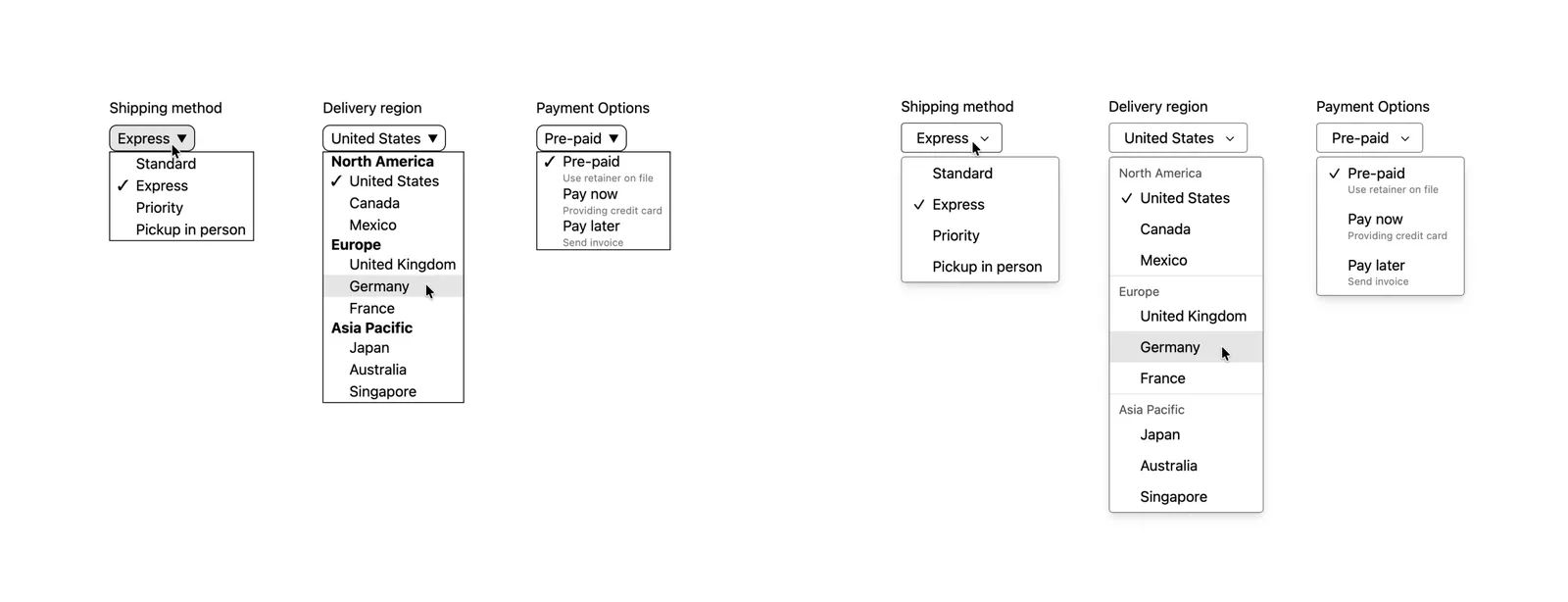
This matters for checkout and booking forms. Shipping method, country and size pickers can now look on-brand while staying native, accessible and fast.
Scroll anchoring stops jumping pages
Safari 27 turns on scroll anchoring by default. When content loads above the part of the page a visitor is reading, such as a late ad, a cookie banner or a lazy-loaded image, Safari keeps the reader's place instead of pushing the text down. Developers can opt out with overflow-anchor: none. For sites that suffer from layout shift, this is a welcome change, but it can also alter how infinite scroll and chat-style interfaces behave, so test them.
Smarter lazy-loaded images
Using sizes="auto" on an image with loading="lazy" lets the browser pick the right image size from the actual layout width. That means less manual work in responsive image markup and fewer oversized downloads on phones.
3D products with the model element
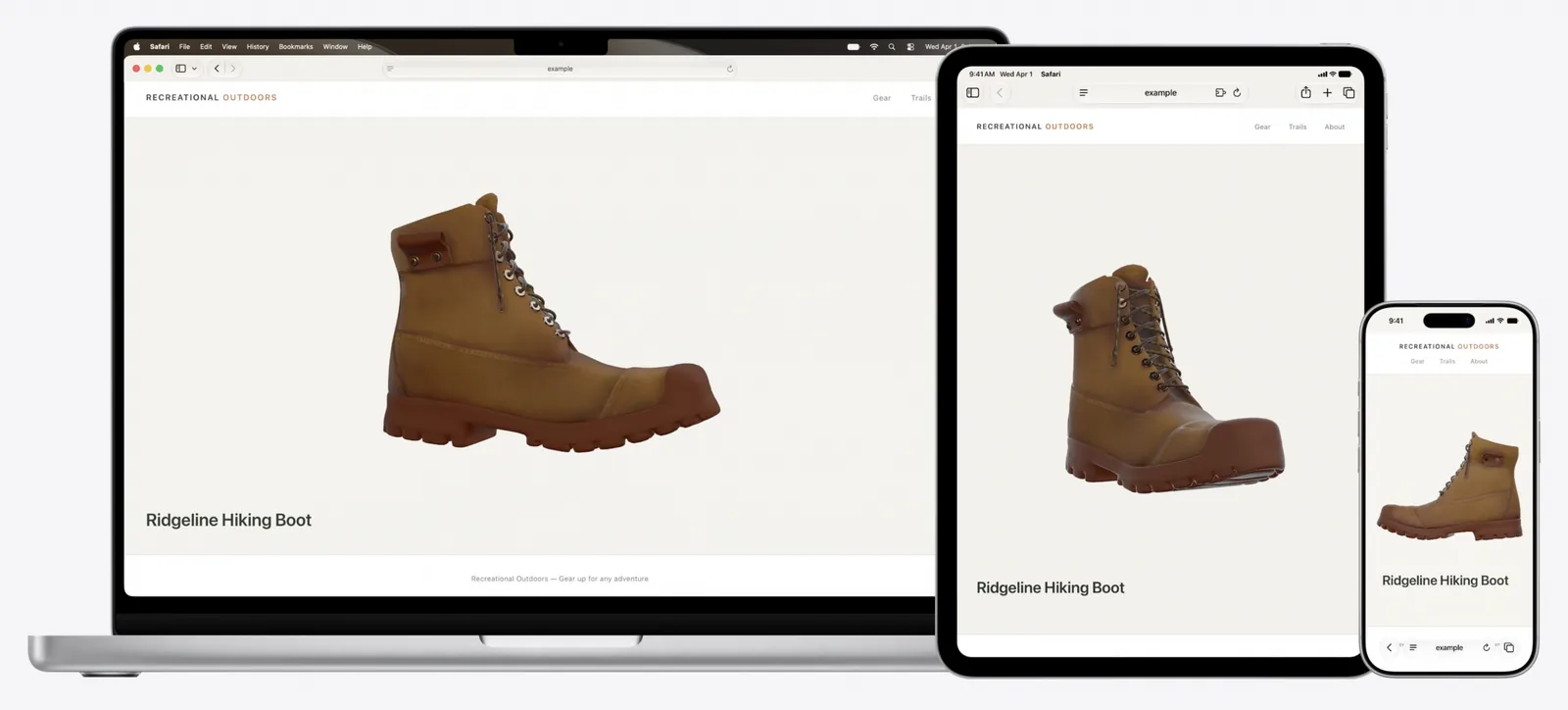
The HTML <model> element now works on iOS, iPadOS and macOS, not just Apple Vision Pro. Stores can embed an interactive 3D product directly in a page, with fallbacks for browsers that do not support it.
Other changes developers will notice
- A rewritten JavaScript module loader that follows the spec and fixes top-level
awaitordering bugs. text-wrap: balancenow works together with-webkit-line-clamp, a common pattern for product card titles.- Anchor positioning now handles transforms, and the
position-anchordefault changed, which can affect tooltips and popovers. - Service Worker static routing, improved streams, and
maxAgesupport in the Cookie Store API. - Performance fixes for
IntersectionObserverandResizeObserver, which many lazy-loading and analytics scripts rely on. - Several Content Security Policy fixes, including a regression that made some sites log CSP errors and fail to display.
What Is the Safari MCP Server?
Safari 27 includes a local MCP server that lets AI coding agents see what Safari sees: rendering, the DOM, network requests, screenshots and console output. WebKit says it runs locally and makes no network calls of its own. Developers turn it on in Safari settings under Developer by allowing remote automation and external agents.
For you as a site owner, the practical gain is better testing. An agent can now open your page in real Safari, spot a broken layout or a console error, and help fix it. Safari 27.2 fixed a bug where Safari took keyboard focus from other apps while an agent opened tabs or captured screenshots.
What Do Safari 27's Consumer Features Mean for Websites?
Apple also added features that change how people use websites, not just how sites are built. Siri AI adds another layer, which I cover in what iOS 27 Siri AI means for websites:
- Tab topics: Apple Intelligence can automatically group open tabs into topics.
- Notify Me: Safari can watch a page and alert the user when it changes, for example a product restock or a price drop.
- Describe an extension: users can create a custom Safari extension by describing what they want.
- Ask to Browse: on child accounts, kids must ask a parent before visiting a new website.
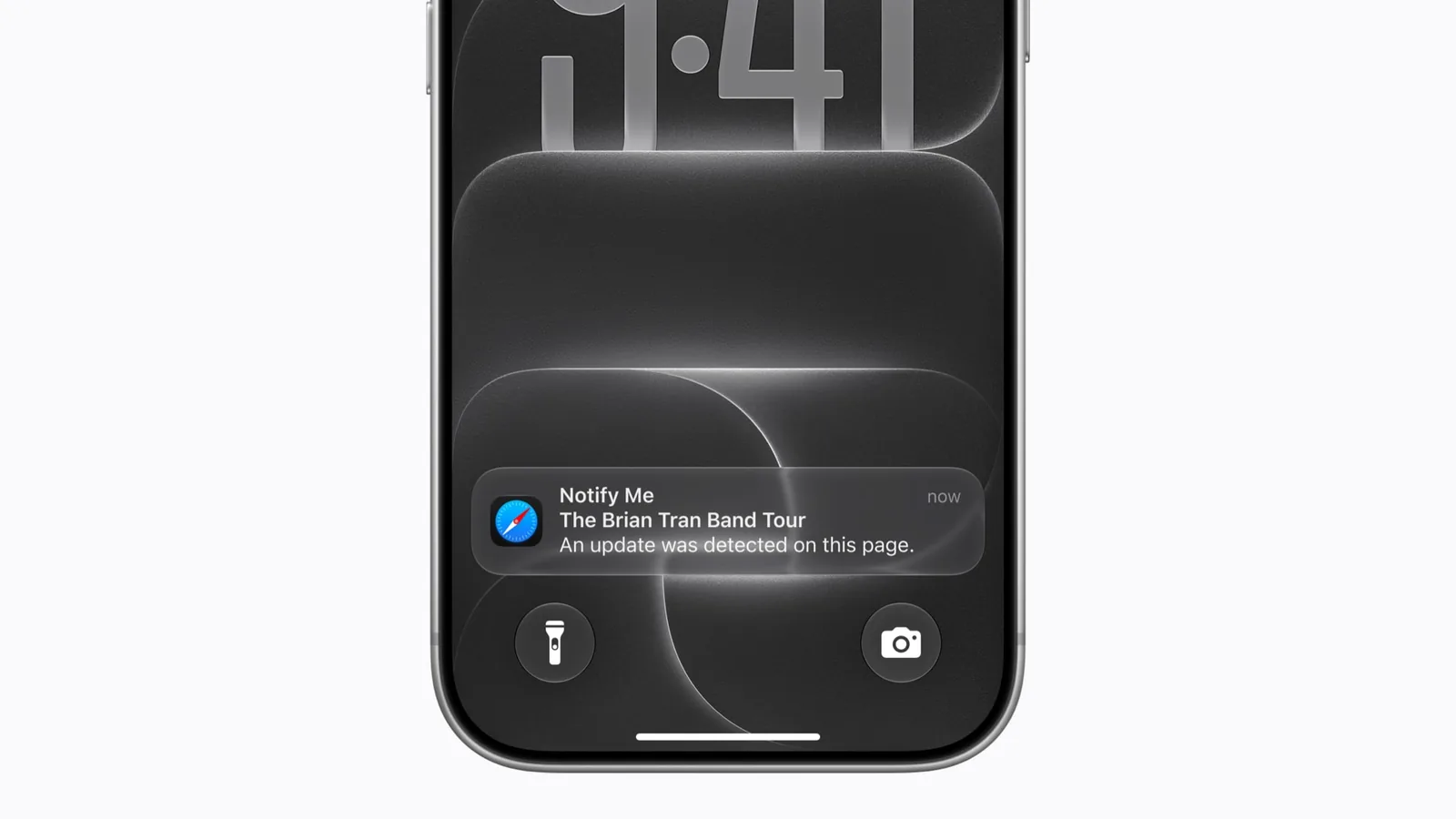
Notify Me is the one store owners should think about. If shoppers can ask Safari to watch your product page, the stock status and price need to be clear, visible text on that page, not hidden in a script or an image.
Chrome Now Ships Every Two Weeks
Safari is not the only browser speeding up. Google announced that starting with Chrome 153 on September 8, 2026, a new Chrome beta and stable version ships every two weeks instead of every four, on desktop, Android and iOS. Each beta arrives about three weeks before its stable release. For businesses that manage company laptops, the Chrome team notes: "Extended Stable will continue with its existing eight-week cycle."
Chrome 156 entered beta on September 30 and Chrome 157 on October 15, according to the Chrome for Developers blog. Smaller, more frequent releases should be less disruptive one by one, but they also mean a site that is never tested can break without anyone noticing for weeks.
What Safari 27 Means for Your Website
For US small businesses and online stores, these updates are mostly good news. But they are also a reminder that browsers keep changing underneath your site. Here is what I would check now.
- Test your key pages in Safari 27 on iPhone and Mac. Check the home page, product pages, cart, checkout and contact forms. Look for jumping content, broken popovers and menus that render differently.
- Review your dropdowns and form controls. If your theme uses a heavy JavaScript select library, customizable select can replace it on supporting browsers and cut page weight. Keep a fallback, since support is not universal yet.
- Test photo uploads from iPhones. WebKit lists a fix so HEIC images are no longer converted to JPEG when uploaded through drag-and-drop or a file input. If your quote form, review widget or custom product tool only accepts JPEG and PNG, confirm it still works and convert HEIC on the server if needed.
- Make stock and price clear in the page. Notify Me and AI agents both read what is on the page. Plain, structured product information helps both. My guide to making a website agent-ready covers structured data.
- Re-check layout shift and responsiveness. Scroll anchoring may improve your Cumulative Layout Shift, but measure it. If interactions feel slow, my Interaction to Next Paint guide shows where to look.
- Use the new CSS where it helps. Anchor positioning, view transitions and scroll-driven animations can replace a lot of JavaScript. I explain them in modern CSS in 2026.
- Put browser testing on a schedule. With Chrome shipping every two weeks and Safari releasing point updates through the year, a monthly check of your top pages in current Safari and Chrome betas is cheap insurance.
Frequently asked questions
When was Safari 27 released?
Safari 27 shipped in September 2026 alongside iOS 27, iPadOS 27, macOS 27 Golden Gate and visionOS 27, which Apple began rolling out on September 14. WebKit published the Safari 27.0 release notes on September 17. Mac users on macOS Tahoe or Sequoia can update Safari separately, and Safari 27.2 followed on October 26.
What is customizable select in Safari 27?
Customizable select lets developers fully style the HTML select dropdown with CSS. A site opts in with appearance: base-select, then styles parts like the picker icon and checkmark. The control stays a native form element rather than a JavaScript imitation, so it can match the brand without the weight of a custom widget, which helps checkout and booking forms.
Will Safari 27 break my website?
Most sites will work as before, and many will improve thanks to 844 fixes. The changes most likely to affect existing pages are scroll anchoring, the new anchor positioning default, the module loader rewrite and stricter standards behavior for some features. Testing your key pages and forms on an iPhone and a Mac is the safest approach.
What is the Safari MCP server?
The Safari MCP server is a local tool in Safari 27 that lets AI coding agents inspect pages in Safari, including the DOM, network requests, screenshots and console output. WebKit says it runs locally and makes no network calls of its own. Developers enable it in Safari's Developer settings by allowing remote automation and external agents.
How often does Chrome update now?
Since Chrome 153 reached stable on September 8, 2026, Google ships a new Chrome stable and beta every two weeks on desktop, Android and iOS, instead of every four weeks. Each beta arrives about three weeks before stable. Extended Stable for managed enterprise devices keeps its eight-week cycle.
Browsers Move Fast, So Test Often
Safari 27 gives developers tools that used to need custom JavaScript, and it fixes hundreds of long-standing bugs. Combined with Chrome's faster release schedule, the message is simple: the web platform is improving quickly, and sites that are tested regularly benefit, while sites left alone slowly drift out of date.
If you want your store or website checked in Safari 27 and the latest Chrome, or rebuilt with modern CSS that loads faster on iPhone, send me your site link. I work with US businesses across time zones, and you can see my approach in my web development case studies. I will reply within 24 hours.